Keeper workflows
Run a keeper-handover restore drill with a fictional example file
Download a supported FishyMag example backup and compare every restored field, including planned actions, unknowns and written units, before relying on a restore.
By FishyMag · Published
FishyMag editorial workflow · Not a clinical review or treatment recommendation.
Quick answer
Save your current entries, then use the clearly labelled demonstration backup for a separate restore check. Opening a valid file restores supported fields; finding the file alone proves nothing about its contents. Compare identity, time, completed and planned entries, questions and units before calling the restore successful.
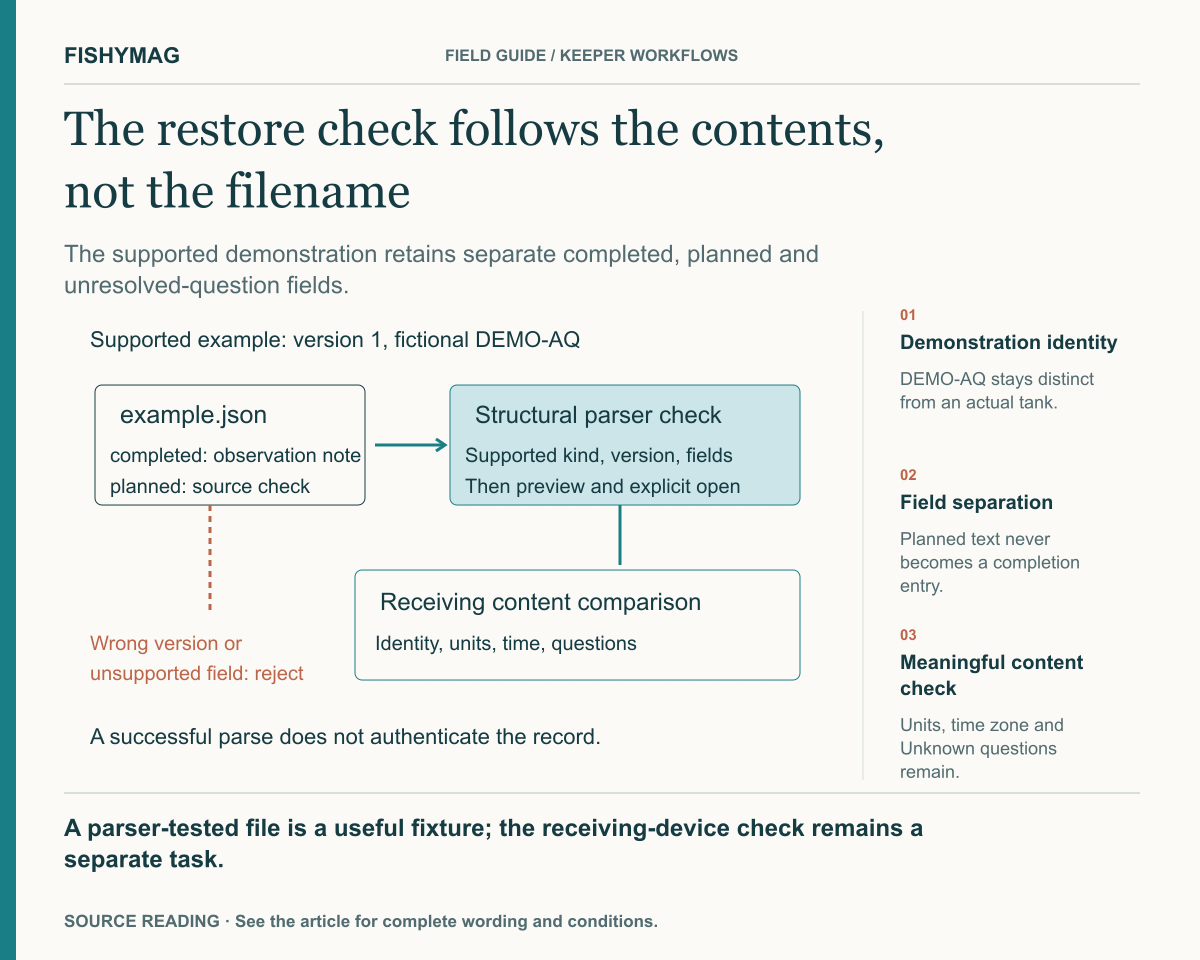
Figure data and explanation
The supported demonstration retains separate completed, planned and unresolved-question fields.
- Demonstration identity
- DEMO-AQ stays distinct from an actual tank.
- Field separation
- Planned text never becomes a completion entry.
- Meaningful content check
- Units, time zone and Unknown questions remain.
A parser-tested file is a useful fixture; the receiving-device check remains a separate task.
Use a demonstration before risking current entries
The downloadable file is a fictional FishyMag handover, not an aquarium plan. It contains no treatment quantity or livestock recommendation. The current handover interface previews a supported backup before the separate “Open this backup” action. Opening it replaces the fields on that page, so download your current entries first. Cancelling the preview leaves those fields unchanged. A restore exercise concerns the record, not live aquarium equipment.
What this example actually tests
The example was generated with the site’s version 1 backup formatter and checked with its parser. The check compared every supported field with the source text, including the distinction between planned and completed entries and the written µS/cm unit. That is a code-level artifact check. It is not a claim that a person completed the browser exercise or that an actual keeper’s facts were verified.
| Field or condition | Expected example content | Acceptance check |
|---|---|---|
| System identity | DEMO-AQ: fictional restoration exercise | Do not confuse it with your own aquarium |
| Record time | 2026-11-08 15:00 +06:00; fictional example | The written time zone remains attached |
| Completed field | Fictional observation note only; no treatment action included | Do not replace it with the planned note |
| Planned field | Check the source identity later; planned, not completed | Planning remains visibly separate |
| Questions field | Source identity and historical exposure remain Unknown | Unknowns are not silently cleared |
| Unit text | µS/cm and mg/L are retained as written units | Characters and unit wording survive |
| Unsupported version or extra field | Parser check rejects the altered example | Unsupported structure is not imported as a valid backup |
Complete the receiving-device check
Identify the downloaded file, choose it in the keeper-handover tool and inspect the preview. If you proceed with “Open this backup,” compare each field against the acceptance sheet. Export another editable copy and keep its relationship to the example clear. Do not call a restore complete merely because the file picker closed or one tank name appeared. A changed export timestamp is different from a changed record-time field; check the supported contents rather than expecting identical file bytes.
Record a narrow result
The useful result is: “The selected example opened and the listed fields matched,” followed by the device, tool version or check date and any discrepancy. Record a failed field separately. Importing a file does not authenticate its factual claims, synchronise another keeper’s copy or restore unrelated attachments. Keep the original and exported copies until you have checked the result. The demonstration file is for this exercise and should remain labelled DEMO-AQ.
Use your own details
Run a keeper-handover restore drill with a fictional example file worksheet
Download the editable text file, fill it in on your device and keep it with the relevant record. This blank worksheet records your information; it does not verify entries or approve treatment.
- Check date and receiving device
- Original entries saved before the exercise
- Example file identity
- Preview inspected or cancelled
- Supported fields compared
- Completed versus planned distinction retained
- Units, time zone and questions retained
- Narrow result and discrepancies
Worked example files
These files contain the article’s worked example. Read its source and scope notes, and keep your own current records before opening an example in a tool.
Put it into practice
Your checklist
- Download your current entries before opening the demonstration.
- Compare every supported field, especially plans and Unknown entries.
- Record a successful content restore without claiming factual authentication.
Sources and scope
This article distinguishes manufacturer statements from FishyMag’s own workflows and arithmetic examples. Linked formulation records retain their own evidence dates; publishing this article does not refresh those records.
AI-assisted writing and development. Not hands-on product testing or veterinary review. How we publish →
FishyMag reports what manufacturers say, quoted and linked. It does not diagnose illness or recommend a treatment, and it never infers that a product is safe from the absence of a warning — where no statement exists, it says so.
Formulations change. Always read the label on the bottle in your hand, and contact the manufacturer if your tank contains anything valuable or unusual.